
Problem
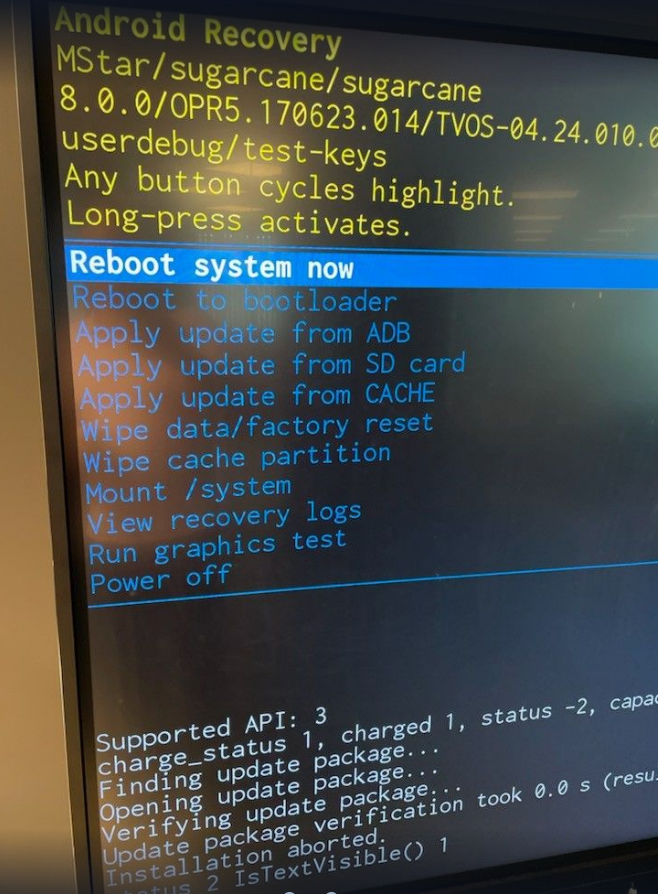
Stuck on android boot screen during OTA systemFW upgrade
Solution
Select Reboot Now with the remote control.
Entere Debug Menu via INPUT 3 9 3 9 and select Init Touch.
Download and install the OTA systemFW again
Related articles
- I3TOUCH EX Remove pin code from lock screen and settings
- i3TOUCH EX65 display can have some ghost touches when two EX65 displays are mounted very close together.
- i3TOUCH X3 write systemFW without remote controller
- i3TOUCH EX write systemFW without remote controller
- i3TOUCH E-One & EX How to do a factory reset
- i3TOUCH EX How to put custom wallpaper
- i3TOUCH Troubleshooting
- i3TOUCH ES Troubleshooting
- i3TOUCH PX Troubleshooting
- i3TOUCH ULTRA write systemFW without remote controller
- Troubleshooting for i3TOUCH ULTRA
- Troubleshooting for i3TOUCH X3
- i3TOUCH EX How to disable the cast-to feature
- i3TOUCH ULTRA Troubleshooting
- i3SIXTY 3 write systemFW without remote controller
- i3TOUCH EX systemFW to i3STUDIO 3.0.10 fails via OTA
- i3TOUCH E10 / EX Allow .APK installation from unknown sources
- i3TOUCH X-ONE Troubleshooting
- I3TOUCH EX How to change your wallpaper
- I3TOUCH ES, EX, and E-One How to connect a bluetooth device
- i3TOUCH EX How to clear cache and data from an application
- i3TOUCH P2 write systemFW without remote controller
- i3TOUCH EX write systemFW without remote controller
- i3TOUCH ES the volume bar slides automatically back
- I3TOUCH ES, EX, and E-One How to connect a bluetooth device
- i3TOUCH EX rewrite touchFW and calibrate
- i3TOUCH EX How to change the physical keyboard layout
- Write System FW Without a Remote Controller on Elm 2 - Troubleshooting
- Troubleshooting for i3TOUCH ES
- Troubleshooting for i3TOUCH X-ONE
- i3TOUCH E-One & EX How to do a factory reset
- Troubleshooting for i3TOUCH P2
- Write System FW Without a Remote Controller on Elm 2 - Troubleshooting
- i3TOUCH EX rewrite touchFW and calibrate
- i3TOUCH ES How to test your touch
- i3TOUCH E10 Troubleshooting
- i3TOUCH ES hdmi cec does not work
- i3TOUCH X3 write systemFW without remote controller
- i3TOUCH EX systemFW to i3STUDIO 3.0.10 fails via OTA
- i3TOUCH EX Troubleshooting
- i3STUDIO Troubleshooting
- i3TOUCH EX How to clear cache and data from an application
- Troubleshooting for i3TOUCH PX
- i3TOUCH EX How to change the physical keyboard layout
- i3TOUCH ULTRA write systemFW without remote controller
- i3TOUCH EX How to put custom wallpaper
- i3TOUCH E-ONE touch signal test
- i3TOUCH EX How to install apps from "unknown source"
- i3TOUCH EX
- i3TOUCH P2 write systemFW without remote controller
- i3TOUCH ES How to test your touch
- i3TOUCH EX How to install apps from "unknown source"
- Troubleshooting for i3TOUCH EX
- i3TOUCH E-ONE Troubleshooting
- Troubleshooting for i3TOUCH E-ONE
- Manual - i3TOUCH PX
- Installing network certificates on Elm 2 - Troubleshooting
- i3TOUCH EX remove settings password
- Manual - i3TOUCH EX
- i3TOUCH P2 Troubleshooting
- I3TOUCH EX How to change your wallpaper
- i3TOUCH ES the volume bar slides automatically back
- i3TOUCH EX How to disable the cast-to feature
- i3TOUCH EX remove settings password
- Manual - i3TOUCH PXr
- I3TOUCH EX Remove pin code from lock screen and settings
- i3TOUCH EX65 display can have some ghost touches when two EX65 displays are mounted very close together.
- i3TOUCH X3 Troubleshooting
- i3TOUCH E-ONE write systemFW without remote controller
- i3TOUCH E-ONE touch signal test
- i3TOUCH E-ONE write systemFW without remote controller
- i3TOUCH E10 / EX Allow .APK installation from unknown sources
- i3TOUCH ES hdmi cec does not work