
🌱 Instructions
Tools:
USB disk (SanDisk, Format FAT32)*1PCS.
Procedure
(0) Make sure the IFP is switched off
(1) Format the USB2.0 [mininum 4GB] stick as FAT32.
(2) Extract upgrade file to the U disk (FAT32) in the root directory. You will get "upgrade_982" folder. Insert
USB disk into the USB2.0 port 3 [right bottom side, see marked picture below] of the display.
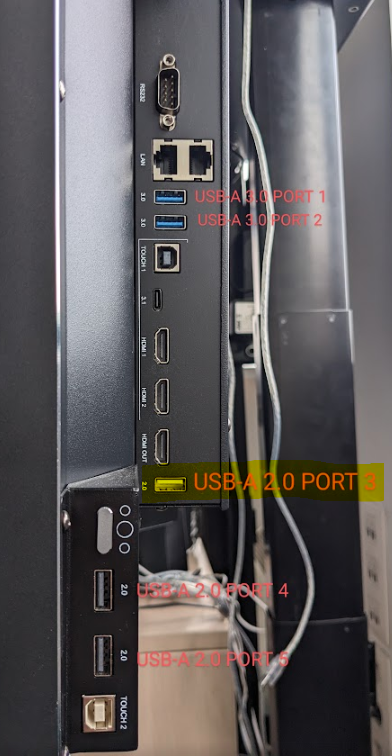
(3) Power on the panel. Press the POWER key and hold it until the power LED blinks red and white.
The TV will upgrade first. When finished, the screen will reboot and upgrade MCU automatically. It will take 4 minutes to complete the upgrade procedure.
If the firmware does not seem to be loading/installing, call out the factory information page using the remote: INPUT 3 9 3 9
The .IMG file which you downloaded, must be renamed to the name you see next to “upgrade file”, which you can find in that information page.

Do not interrupt the firmware upgrade process in any way:
-
Do not touch the i3TOUCH display (due to potential touch recalibration)
-
Do not disconnect the i3TOUCH from power.
-
Do not pull out the USB drive
📁 Files
Choose the correct size of you display. Find out reading the serialnumber. For example i3TE175XXXXXXX is 75 inch.
|
|
Version 1.3.1 [Nov 2022] |
Version 1.3.4 [Feb 2023] |
Version 1.4.2 [May 2023] |
v2.1.1 (June 2024) |
v2.1.2 (Aug 2024) |
v2.1.5 (Dec 2024) |
|---|---|---|---|---|---|---|
|
E155 |
|
|
||||
|
E165 |
||||||
|
E175 |
||||||
|
E175+ |
|
|
|
|||
|
E186 |