
When you connect to the display wirelessly using AirPlay, Miracast, the AllSync Transmitter software, or another wireless sharing method provided by i3Allsync, and the image appears pinkish upon connection, please disable hardware decoding. This setting is available in the hidden AllSync settings on app version 4.6.0-014.
Use this only when needed: Follow these steps if the wireless display image appears pinkish after connecting via AirPlay, Miracast, the AllSync Transmitter software, or another wireless sharing method. The setting applies to the AllSync app and may affect display performance.
Open the hidden AllSync settings
-
Open i3Allsync (Present).
-
Tap the Settings cogwheel.
-
Open Information.
-
Tap the software version number three times to open the hidden settings page.
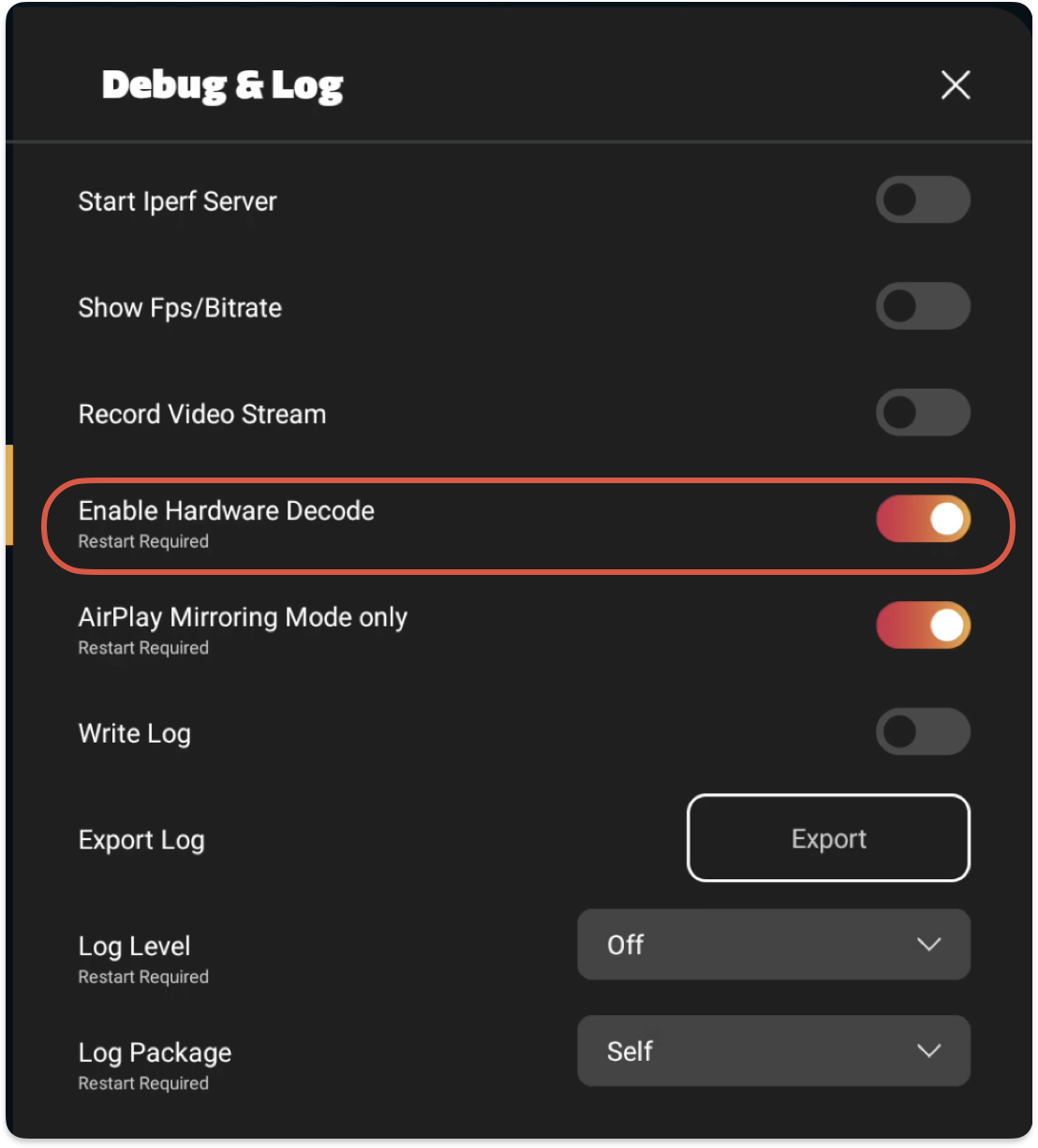
Disable hardware decoding
-
On the hidden settings page, find Enable hardware decode.
-
Disable the option.
-
Reconnect to the display, if necessary, and check whether the image is no longer pinkish.
If the image remains pinkish after disabling hardware decoding, verify the wireless connection quality and reconnect the display.
Tags: wireless connection, AllSync, display troubleshooting