
🌱 Instructions
-
Download the zipped firmware file below.
-
Unzip the .zip file. Find the .bin file and extract it to your drive.
-
Make sure the name of the .bin file is MstarUpgrade_848.bin and copy the file to the root directory of an empty USB drive, which is FAT32 formatted.
-
Turn off the display and change the ON/OFF switch to OFF.
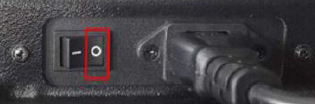
-
Insert the USB drive into any USB 2.0 port (black) of the i3TOUCH ES.
-
Press and hold the power switch and turn the ON/OFF switch to ON.

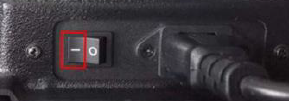
-
Keep holding the power button until you see below upgrading screen.
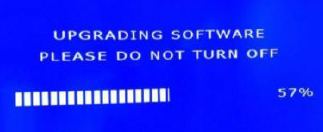
-
Installing the FW takes +- 10 minutes.
-
Wait until the i3TOUCH has fully rebooted.
Do not interrupt the firmware upgrade process in any way:
-
Do not touch the i3TOUCH display (due to potential touch recalibration)
-
Do not disconnect the i3TOUCH from power.
-
Do not pull out the USB drive
📁 Files
Choose the correct size of you display. Find out by reading the serialnumber. For example i3TEX75XXXXXXX is 75 inch.
Firmware version 3.0.5 for mainboard model type 171 is for serial number I3TES98CK290001 and above.
For all serial numbers lower than I3TES98CK290001 you need to use the firmware for mainboard model type 111 or 121
|
|
version 3.0.2 [feb 2022] mainboard modeltype 111 or 121 only |
version 3.0.5 [jul 2022] mainboard modeltype 111 or 121 only |
version 3.0.5 [jul 2022] mainboard modeltype 171 only |
|---|---|---|---|
|
75inch |
not available yet |
||
|
86inch |
not available yet |
||
|
98inch |