
📘 Instructions
-
Download the touch upgrade tool according to your display size, more information is at the bottom of the page
-
Open the program WDT8652_Ptool_2010 which can be found in WIN8 folder

-
Connect your computer to the display with the HDMI + USB A-B cable for touch or USB-C-C cable.
-
Please check when you get the message that the device is connected and press “START”
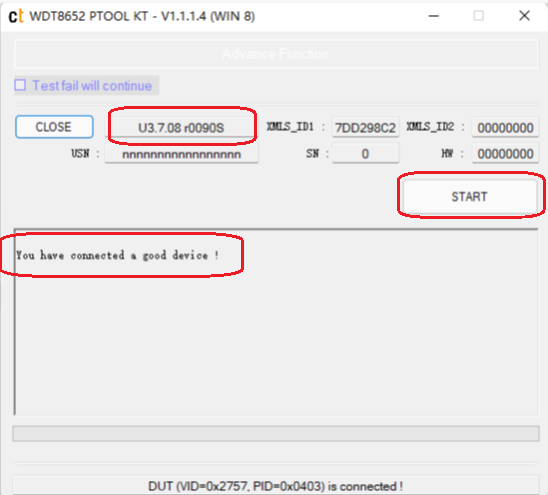
-
When the upgrade is done you may close this upgrade tool
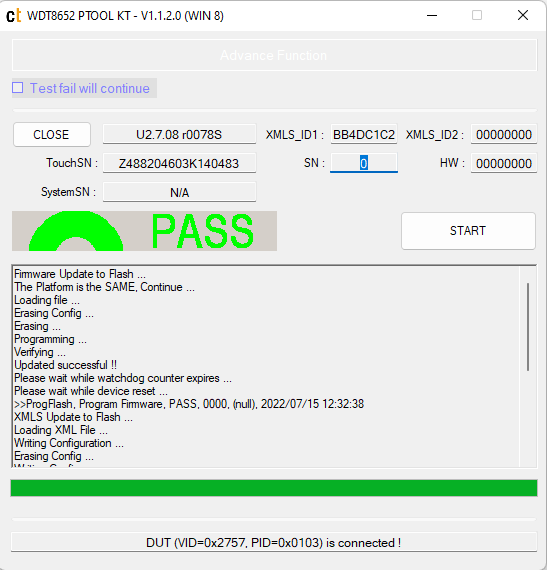
Do not interrupt the touch test process in any way:
-
Do not touch the i3TOUCH display (due to potential touch recalibration)
-
Do not disconnect the i3TOUCH from power.
-
Do not pull out the cables
Choose the correct size of your display. Find out by reading the serial number. For example, i3TPX75XXXXXXX is 75 inches.
Ask your i3agent which one fits your device.
After the touch upgrade, we recommend testing it again.
The touch test tool can be found on this website
https://i3group.atlassian.net/servicedesk/customer/kb/view/926810135