
This guide walks you through the initial setup wizard to get your display ready for action. It is designed for IT administrators or users performing the first-time configuration of an i3CONNECT display. These steps ensure your device is connected, secure, and tailored to your language and regional preferences.
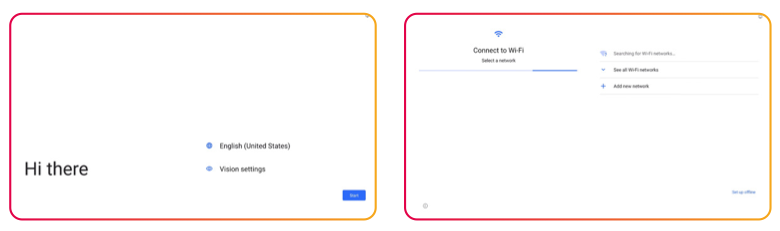
The installation process may differ slightly between displays. For the accurate process follow the user guide of your product.
Before you start
-
Ensure the display is connected to a power source and turned on.
-
Have your Wi-Fi network name and password ready (if not using a wired LAN connection).
Instructions
-
Select your language from the list on the "Hi there" screen and tap Start.
-
Connect to your network by selecting your Wi-Fi from the list and entering the password. If you are using a LAN cable, the display will skip this step automatically.
-
Configure date and time settings to ensure your calendar and updates sync correctly.
-
Adjust Google Services preferences to suit your privacy and functionality needs.
-
Create a security PIN to protect your display settings from unauthorized changes.
-
Apply your settings and wait a moment while the system finalizes the configuration.
-
Choose your interface to complete the setup. You can select between:
-
The tailored https://i3group.atlassian.net/helpcenter/i3connect-support/portal/1023/article/2333442064?source=rovo experience
-
or the standard https://i3group.atlassian.net/helpcenter/i3connect-support/portal/1023/article/2319876141?source=rovo environment.
-
Troubleshooting
-
Wi-Fi not appearing: Ensure your router is within range and broadcasting a 2.4GHz or 5GHz signal.
-
PIN forgotten: If you lose your security PIN, you may need to perform a factory reset. Contact your IT administrator for assistance.
-
Wrong interface selected: You can switch between i3CONNECT Studio and Google EDLA later in the system settings.