
Studio is a user interface custom designed for large displays used in shared spaces. It simplifies the experience to all the tools you need so you don’t have to ever feel lost. Yet it also gives you access to millions of apps on the Google App Store.
If you wish to install Studio on the display instead of the standard Google EDLA interface (which is more complicated), follow the instructions below:
The installation process may differ slightly between displays. For the accurate process follow the user guide of your product.
📘 Instructions
-
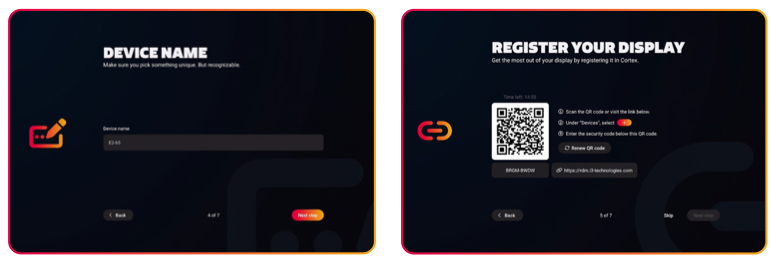
Enter in a unique, but recognisable, device name. This can be used later to manage the display online using i3CONNECT Cortex.
-
Register your display to make use of Cortex remote management. The easiest way is to scan the QR code. Under Devices select “+”. Then enter the security code below the QR code.
-
Go to the next screen and tap on the checkbox to agree to the Terms of use.
-
And then you are all set!