
Before taking this product into use, please read and understand his manual and its guidelines thoroughly. Keep this manual for future reference and for training future additional operators of the product.
Placement and Ambient Conditions
-
The allowable temperature range of the local ambient environment at which this device may operate is between 0°C and 40°C.
-
Do not place the product near a radiator, heater, or other heat source.
-
If the unit is suddenly moved from a cold to a warm place (e.g. from a truck), keep the power cable unplugged for at least 2 hours and make sure that any moisture inside the unit is evaporated.
-
Do not expose the unit to rain, or a very humid weather condition.
-
Make sure that the indoor environment is dry and cool. The allowable humidity range of the local ambient environment at which this device may operate is between 10% RH and 90% RH.
-
Place the unit in a well-ventilated place, so heating can escape easily. Ensure that the unit has enough space for ventilation. A 10 cm space at the left, right, and bottom of the unit should be clear, and 20 cm should be kept clear above the device.
-
Install the display upright and level, with a vertical tilt no greater than 3°.
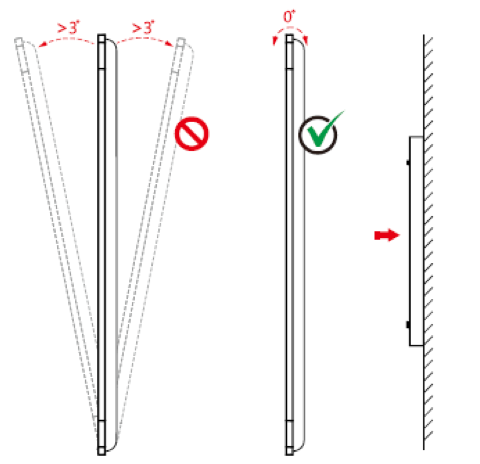
For display sizes of 75 inches or larger, it is strongly recommended to mount the display as vertically as possible to prevent the frame from being subjected to diagonal stress. This stress can cause a permanent hardware malfunction, resulting in the touchscreen no longer functioning properly.
Environmental
Do not dispose of batteries in the trash. Always follow local regulations on the collection of batteries.
Other
All images and instructions within this manual are designed or written mainly for indicative purposes. There may be differences or changes between pictures/instructions and the actual product.
Setup and Installation
-
Read the complete installation guide, and prepare all tasks, before executing the first step.
-
Do not put heavy objects on top of the unit.
-
Do not put the unit near appliances that generate magnetic fields.
-
Do not expose the unit to direct sunlight and other sources of heat.
-
Do not place the unit on an unstable cart, stand, tripod, bracket, table, or shelf.
-
Do not put any liquid near or on the unit, make sure do not spill any
Electrical Safety
-
Keep the power cable risk-free from physical or mechanical damage.
-
Check and ensure that the power source (wall outlet) is connected with the ground.
-
Unplug the power supply to the unit when the weather is thunder-storm or lightning.
-
Check that your local power supply characteristics are suitable for the product’s operation voltage.
-
Only use the original power cable from the accessory bag. Don’t modify or lengthen it.
-
Unplug power supply cable when the unit will be in inactive for a longer time.
Maintenance and Cleaning
-
Always unplug the power cable before cleaning.
-
Clean the screen only with soft, dustless, dry cloths,
-
especifically intended for LCD screen cleaning.
-
For a deeper clean, always contact an authorized service center.
-
Never use water or any spray-type detergent to clean the unit.
-
Do not open the device. There are no user-serviceable parts inside.