
The MAC address for a transmitter is a unique hardware address. To retrieve the MAC address from a transmitter, you need a WiFi Spectrum Analyzer app on your phone.
\uD83D\uDCD8 Instructions
-
Download and install 'wifi analyzer' or similar WiFi spectrum analyzer app on your phone.
-
Long press the button on the i3Allsync transmitter until the LED indicator is flashing white (pairing mode). When the transmitter is put in pairing mode, it creates a temporary WiFi network called ‘CT1000TX’ or similar.
-
Open the wifi analyzer app on your phone and look for the network called 'CT1000TX ' on the 2,4GHz band (the i3Allsync transmitters do not work on the 5GHz band).
-
The MAC address will be shown next to the 'CT1000TX' network.
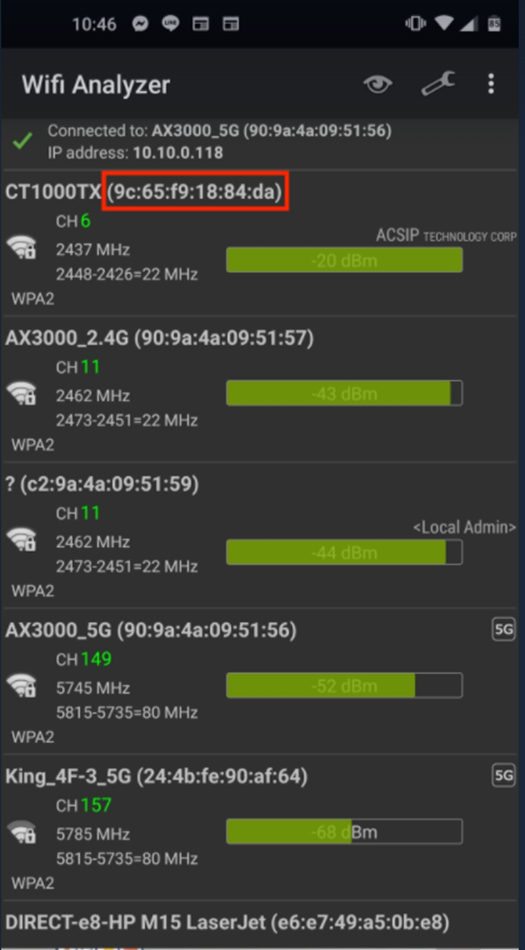
Having the MAC address could be crucial information if you are using MAC filtering in your network. You then need to enter the MAC addresses for all permitted network devices in the Access Control List (ACL) of your network management device.
\uD83D\uDCCB Related articles
- I3TOUCH X-One How to see the software version of an app
- I3TOUCH X2 How to prepare the Display hotspot to connect i3Allsync transmitters
- i3TOUCH EX How to test your touch
- i3TOUCH E-One & EX How to do a factory reset
- i3TOUCH X-ONE how to replace the wifi module
- i3TOUCH ULTRA How to do a factory reset
- How to change the refresh rate of your external monitor
- I3CONNECT ASPEN4 - How to clear the cache and data from an app
- I3LEARNHUB How to create a folder tree
- I3TOUCH X-ONE How to prepare the Display hotspot to connect i3Allsync transmitters
- i3TOUCH ES How to update touch firmware
- I3SIXTY 3 how to clear the cache and data from an app
- I3TOUCH E-One How to prepare the Display hotspot to connect i3Allsync transmitters
- I3COLAB Changing the conferencing app
- i3TOUCH PX How to test the touch on PX
- i3TOUCH X3 how to clear the cache and data from an app
- i3TOUCH EX How to disable the cast-to feature
- i3TOUCH X-ONE how to update touch firmware
- i3SIXTY 3 How to test your touch
- i3TOUCH E-ONE How to enable/disable pixel shift
- i3ALLSYNC USB-C TX (5ghz) How to do a firmware upgrade of the hardware transmitter
- i3TOUCH X3 check for OTA systemFW update
- I3WHITEBOARD The AR tools are not available
- I3TOUCH E-ONE How to activate/deactivate USB Tethering
- i3STUDIO provide device info of
- I3SIXTY2 How to calibrate your USB-C camera ports.
- i3TOUCH EX How to clear cache and data from an application
- i3TOUCH X-ONE how to disable Android
- How to clean my display
- i3TOUCH PX How to upgrade touch firmware on the PX
- i3TOUCH X-ONE How to change your wallpaper
- i3COLAB How to link MS Whiteboard in Colab/huddle Launcher
- i3ALLSYNC TX46 How to do a firmware upgrade of the hardware transmitter
- i3TOUCH ES How to do a factory reset
- i3TOUCH X-ONE How to install an APK through USB stick
- i3TOUCH X3 How to do a factory reset
- i3CONNECT ELM2 - How to perform a factory reset
- i3TOUCH X-One How setup the multifunctional button
- i3TOUCH ES How to test your touch
- i3TOUCH ULTRA How to clear cache and data from an app
- i3TOUCH PX How to do a factory reset
- i3ALLSYNC reinstall Allsync audio drivers
- i3TOUCH ES How to check touch firmware
- i3TOUCH ULTRA How to test the touch
- i3TOUCH E-ONE how to disable Android
- i3SIXTY 2 Upgrade camera systemFW
- i3TOUCH X2 How to clear cache and data from an app
- i3ALLSYNC How to pair an Allsync dongle to a display
- i3COMPUTER OPS#10 update bios
- i3TOUCH PX How to clear cache and data of Whiteboard/Annotate
- i3TOUCH EX How to put custom wallpaper
- i3TOUCH X-ONE / X2 How to test your touch
- i3TOUCH E-ONE Choose the start-up option
- i3CAST-TO How to pair 2 displays with i3Cast-to
- i3SIXTY 3 check for OTA systemFW update
- I3Allsync How to make an Cast-to connection
- I3TOUCH EX How to change your wallpaper
- i3ALLSYNC TX45 How to do a firmware upgrade of the hardware transmitter
- i3TOUCH X-ONE how to change your start-up channel
- i3TOUCH X-ONE How to clear cache and data from an app
- i3TOUCH X-ONE How to change the standard browser
- I3TOUCH EX Remove pin code from lock screen and settings
- I3RDM How to install an APK trough RDM
- i3CONNECT ELM2 - how to clear the cache and data from an app
- I3SIXTY2 How to calibrate your USB-C camera ports (ESP)
- i3GLIDE Extended installation and balancing instructions
- i3TOUCH X-ONE How to disable the cast-to feature
- i3TOUCH X2 / X-One How to test your touch
- i3TOUCH E-One How to change your wallpaper
- i3TOUCH X-ONE Set when you want the OPS to boot up
- i3OPS EDLA when starting the conference it appears that the sound and microphone are not working
- i3CONNECT provide device info
- i3TOUCH X-ONE How to do a factory reset
- I3CONNECT ASPEN4 - The display turn off after 4 hours of inactivity
- I3TOUCH general How to prepare the Display hotspot to connect i3Allsync transmitters