
This requires you to have an account. If you have not made one yet, please follow these instructions: Creating an account for i3CONNECT Support
Instructions
Follow the progress of Support tickets made by you, or shared with you by a team member.
-
Go to the portal via https://support.i3-connect.com/
-
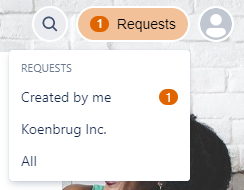
You can find your requests under the button Requests in the top right corner.
-
If a request has some unread progress (e.g. like a response from a i3CONNECT Service team member) then you will see a counter within the button.
-
-
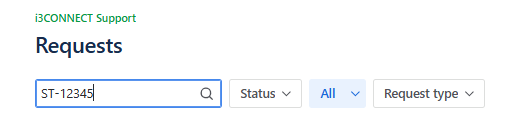
When you are a request participant or the ticket is shared with your organization, you will be able to find the ticket reference in the search bar. Fill in the ticket reference ST-12345 as shown below and make sure that you don’t have an active filter selected.
-
Press Enter to start the search.