
Problem: Can’t press save
Normally you can change your pincode easily via Setting > System > Security > PIN Code. See Change PIN code on Riva for the full instructions. But in your situation, you can’t press save.
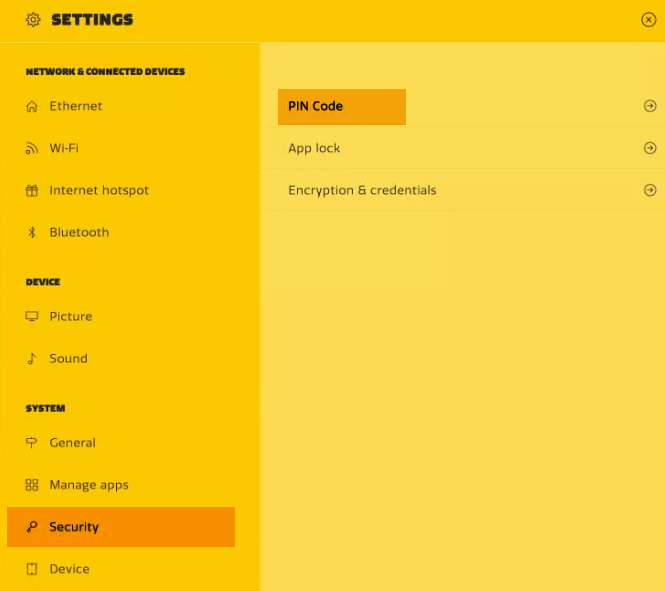
If you have updated to Firmware version 1008 or higher you might encounter the situation below:
-
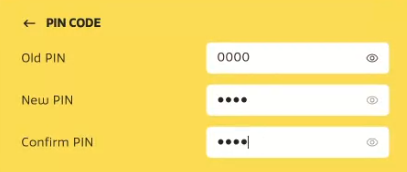
In this example, you want to change your current PIN 0000 to 1234 (not a safe password).
-
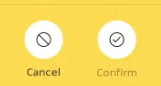
You cant press the Confirm button since it is grayed out
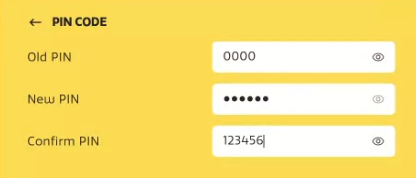
Solution: Enter 6 digits instead of 4
-
Because a 4 digit password is relatively easy to guess, a minimum of 6 digits is required since the 1008 firmware version (The password in the example below is not really a safe one to choose).
-
Now you can tap the Confirm button since it is not longer grayed out.
-
You will get prompted that your PIN was changed successfully.

Still not working?
Please contact our support team at support.i3-connect.com.
For information about the latest firmware version: Firmware Release Notes for Riva 1
Want to learn more about i3CONNECT & Security?