
In large organizations, AllSync transmitters and receivers are often on different subnets. If your network blocks broadcasts or peer-to-peer connections between these subnets, you’ll need to adjust your network settings for AllSync to work smoothly. This guide covers the protocols and ports AllSync uses, and how to enable device discovery and connectivity across subnets.
Before you start
-
You’ll need admin access to your network infrastructure.
-
Familiarity with configuring IP helpers, ACLs, or firewall rules is required.
Required network ports and protocols
AllSync uses these ports and protocols for device discovery and screen sharing:
|
Topic |
TCP ports |
UDP ports |
|---|---|---|
|
HTTP/HTTPS |
TCP 80/443 for direct video links (e.g. YouTube) |
- |
|
Windows / Mac / Android software transmitter |
6618, 6619, 6620, 9090, 9091 |
6618, 6619 |
|
AirPlay (Bonjour) |
7000 (Dynamic ports) |
5353 and UDP for RTP audio |
|
Google Cast |
8008, 8009 |
1900, 5353, and IPv4 group address 224.0.0.251 |
|
Miracast |
7236, 7250 |
- |
|
Dynamic session ports
|
32768–65535 |
32768–65535 |
Miracast sharing on Wi-Fi Direct is using the 2.4 GHz band only.
Miracast will disconnect the display from the Wi-Fi when a computer is sharing to the display.
Enable auto-discovery across subnets
By default, AllSync transmitters (devices) send a UDP broadcast on port 6618 to find receivers (displays) on the same subnet.
If transmitters and receivers are on different subnets:
-
Configure your network to forward UDP broadcasts on port 6618 to the destination subnet or directly to the receiver’s IP address.
-
Set up an IP helper address on the relevant router or switch interface. Point the helper address to the receiver’s IP or the broadcast address of the target subnet.
-
Consult your network equipment documentation for exact steps, as procedures vary by brand.
This step requires network admin access and may not be possible on all network hardware.
Allow AllSync traffic between subnets
If strict network policies prevent broad access:
-
Create ACLs or firewall rules to allow only the required AllSync ports and protocols (see step 1) between the relevant subnets.
-
Avoid opening all traffic unless absolutely necessary for testing.
Manually add the AllSync receiver (Windows/macOS only)
If network changes aren’t possible:
-
Assign a fixed IP address to the AllSync receiver.
-
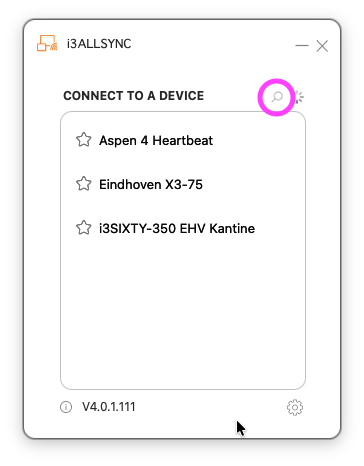
On the transmitter (Windows/macOS), click the magnifying glass icon and enter the receiver’s IP address to connect directly.
Manual IP entry is not available in the Android AllSync app.
Troubleshooting
-
If devices still can’t discover each other, double-check port forwarding and ACL/firewall rules.
-
Manual IP entry is only supported on Windows and macOS transmitters.
-
If you’re unable to configure your network as described, contact your IT team or reach out to i3CONNECT support for further assistance.