
Need to add your AllSync Transmitter Dongle to a network with MAC filtering? Here’s how to quickly find its unique MAC address using your phone. By the end, you’ll have the MAC address ready to add to your network’s Access Control List (ACL).
This guide is for IT admins or anyone managing network access lists. If you’re not using MAC filtering, you probably don’t need this info.
Before you start
-
You’ll need a smartphone with a WiFi spectrum analyzer app (like “WiFi Analyzer”).
-
Make sure your AllSync Transmitter Dongle is connected and powered.
Instructions
-
Install a WiFi analyzer app on your smartphone (search for “WiFi Analyzer” in your app store).
-
Put the AllSync Touch TX into pairing mode: Long-press the button on the transmitter until the LED flashes white.
-
Scan for WiFi networks using the analyzer app. Look for a network named ‘CT1000TX’ (or similar) on the 2.4GHz band.
-
Find the MAC address listed next to the ‘CT1000TX’ network in the app.
Troubleshooting
-
If you don’t see the ‘CT1000TX’ network, make sure the transmitter is in pairing mode (LED flashing white).
-
The transmitter only broadcasts on 2.4GHz, not 5GHz. Double-check your app settings.
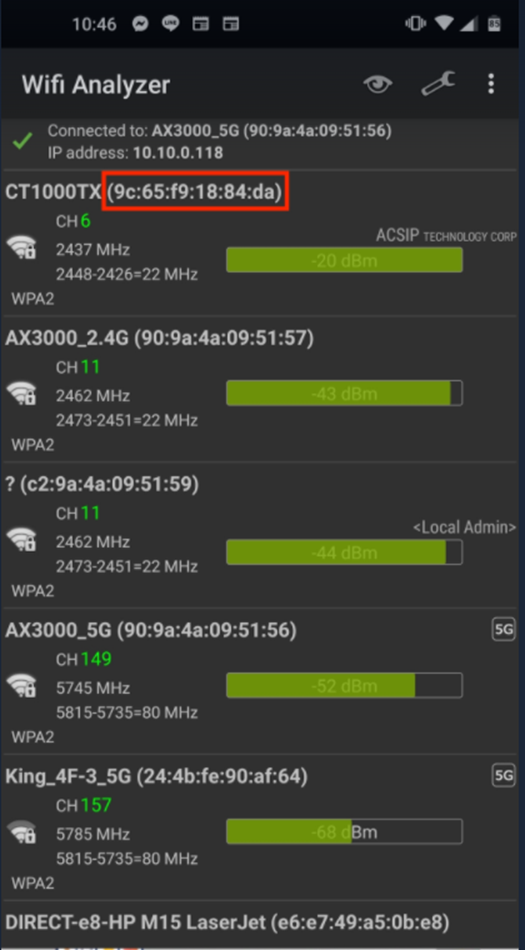
Having the MAC address could be crucial information if you are using MAC filtering in your network. You then need to enter the MAC addresses for all permitted network devices in the Access Control List (ACL) of your network management device.