
🤔 Problem
When the OPS x07 OPS pc’s CMOS battery is depleted, the pc cannot retain its BIOS configuration. When booting the pc with a depleted battery, it can’t find a configuration. During boot, it will create a factory default configuration, save it and then reboot. When this OPS pc is used in an i3TOUCH E10 or E10r display, the following happens:
-
The CMOS battery is dead and there is no power on the OPS. As a result, the BIOS loses its settings.
-
On powering up the display, the OPS regains power. On booting the OPS, it can go find BIOS configuration. The OPS PC will compile a default configuration, save it and then reboot.
-
During that reboot, the display of the OPS PC receives a shutdown signal and will want to switch off. You will see a message on screen that the display will shut down, you can press OK or cancel.
-
When you press cancel in that message, the OPS PC will complete the reboot. Since it is still receiving power from the display, it will boot normally after the reboot.
-
The next time the screen is switched off, you will be back at point 1.
🌱 Solution
The CMOS battery will need to be replaced. The battery is a very common CR2032 3V with Molex connector:
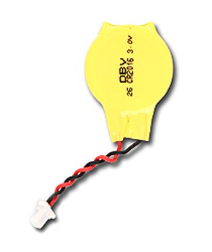
To replace the CMOS battery, you will have to open the case of the OPS PC on the side where the cooling fan exhaust is also located. The battery is glued to the mainboard and has a cord with molex connector which is connected to the maiboard. We recommend leaving the old battery in place because it is glued on and sticking the new battery on top of it with double-sided tape for example. Then unplug the old battery and connect the new battery. Then close the OPS PC casing.
After replacing the battery, you will have to go through the above steps once more because the OPS needs to save the basic settings again first. But once that is done, the problem is solved.
To see a video on how to replace the CMOS battery, please click on the URL below
CMOS battery replacement