
Learn how to update the BIOS version via UEFI.
📘 Instructions
-
Extract the compressed 'zip' file to a Windows system desktop, and then prepare a USB memory stick at least 4GB space and format it in FAT32 format.
-
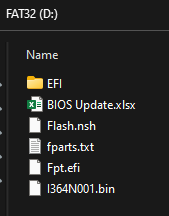
Copy all files from folder to the root directory of USB memory stick so it will look like this:
-
Plugin the USB memory stick in the OPS, and then press powerbutton to start.
-
Hit the DEL button on the keyboard to enter the BIOS. Go to Advanced and switch ME Lock.
OPS 510 > Disabled.
OPS 710 > Enabled.
Save & Exit and restart the OPS.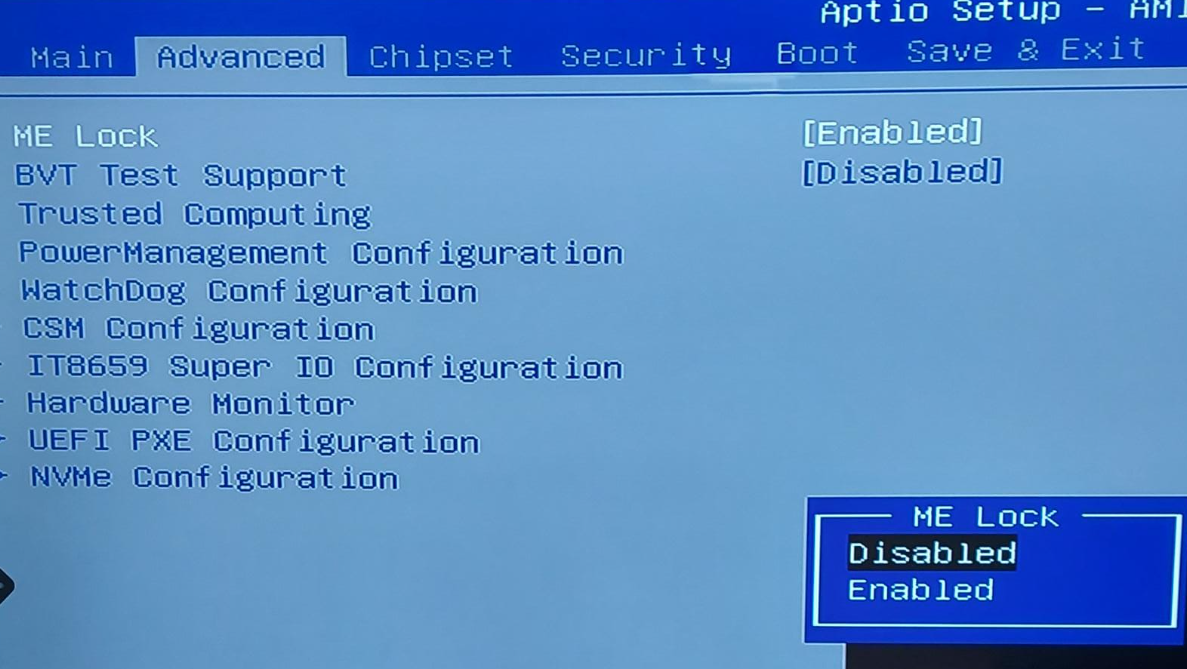
-
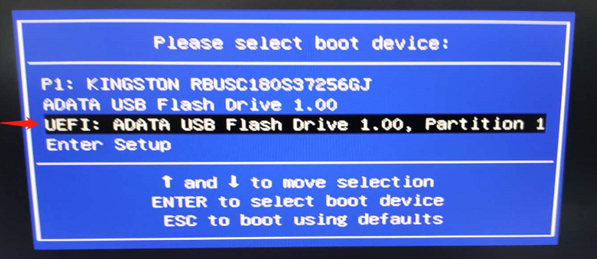
Press F11 key to enter into BIOS boot sequence menu and choose UEFI USB memory stick to boot.
-
Please type " fs0: " command, and press enter key to try to access USB memory stick.
-
type " dir " command to list all contents of USB memory stick.
If you don't find any files related to USB memory stick , please type "fs1: "command and then type "dir " command again until you can see all files related to USB memory stick. -
After entered the correct path to the USB memory stick, please type “FLASH.NSH" and press ENTER to run the script which updates BIOS binary file under EFI system.
-
After BIOS binary file updated successfully, it will show FPT Operation Successful in green font at the bottom of command line.

-
After all is done, please press powerbutton to power off the OPS computer and unplug the power for 10 seconds.