
How to change the fan speed of an OPS#07 and OPS#10. Lower is more quiet but doesnt cool as much as higher speed which produces more noise.
Instructions
-
First of all, a USB keyboard needs to be connected to one of the USB ports of the OPS [touch function isn’t really useable to enter BIOS].
-
As soon as you hear the boot initialization beep, press several times, fast, the DEL key on the attached keyboard. Different OPS’s use different key to enter BIOS, could be F2 or F10.
-
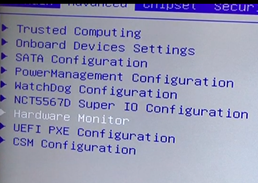
After entering BIOS setting menu, Go to Advanced settings and chose the Hardware monitor item.
There you need to enable the Smart CPU Fan Controller:
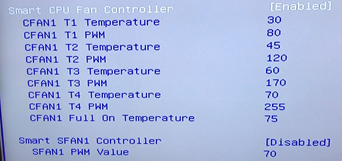
Different OPS’s have different option names, but it’s just semantics:
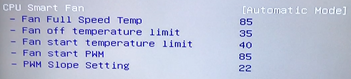
After that you return to the main menu by pressing the ESC key and go to the Save and Exit to actually save the settings. The OPS will reboot.
video’s: