
When your OPS x07 keeps rebooting in an i3TOUCH E10 or E10r display, it’s often due to a depleted CMOS battery. This article is for IT administrators and installers who notice repeated rebooting of the OPS x07 module in these displays. If you’re using a different OPS model or display, these steps may not apply.
If you follow these steps, your OPS x07 should boot normally and retain its settings. If the issue continues after replacing the battery, contact i3CONNECT support.
Before You Start
-
Make sure you have a replacement CR2032 3V battery with a Molex connector.
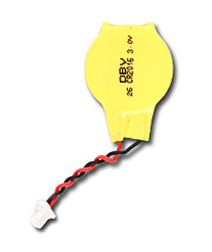
-
Power off and unplug the OPS x07 before opening the case.
-
Have double-sided tape ready if you want to secure the new battery.
Video instructions
To see a video on how to replace the CMOS battery, please click on the URL below
CMOS battery replacement
Instructions
Always power off and unplug before opening the case to avoid electric shock or damage.
-
Power off and unplug the OPS x07 from the display to ensure safety.
-
Open the case on the side with the cooling fan exhaust.
-
Locate the CMOS battery. It’s glued to the mainboard and connected with a Molex connector.
-
Leave the old battery in place (since it’s glued) and use double-sided tape to secure the new battery on top.
-
Unplug the old battery from the mainboard and connect the new battery.
-
Close the case securely.
-
Reconnect and power on the OPS x07. The device will reboot once to save its basic settings.
-
After the first reboot, confirm normal operation. The reboot loop should be resolved.
You will need to go through one reboot cycle after replacing the battery, as the OPS x07 will save its basic settings again.