
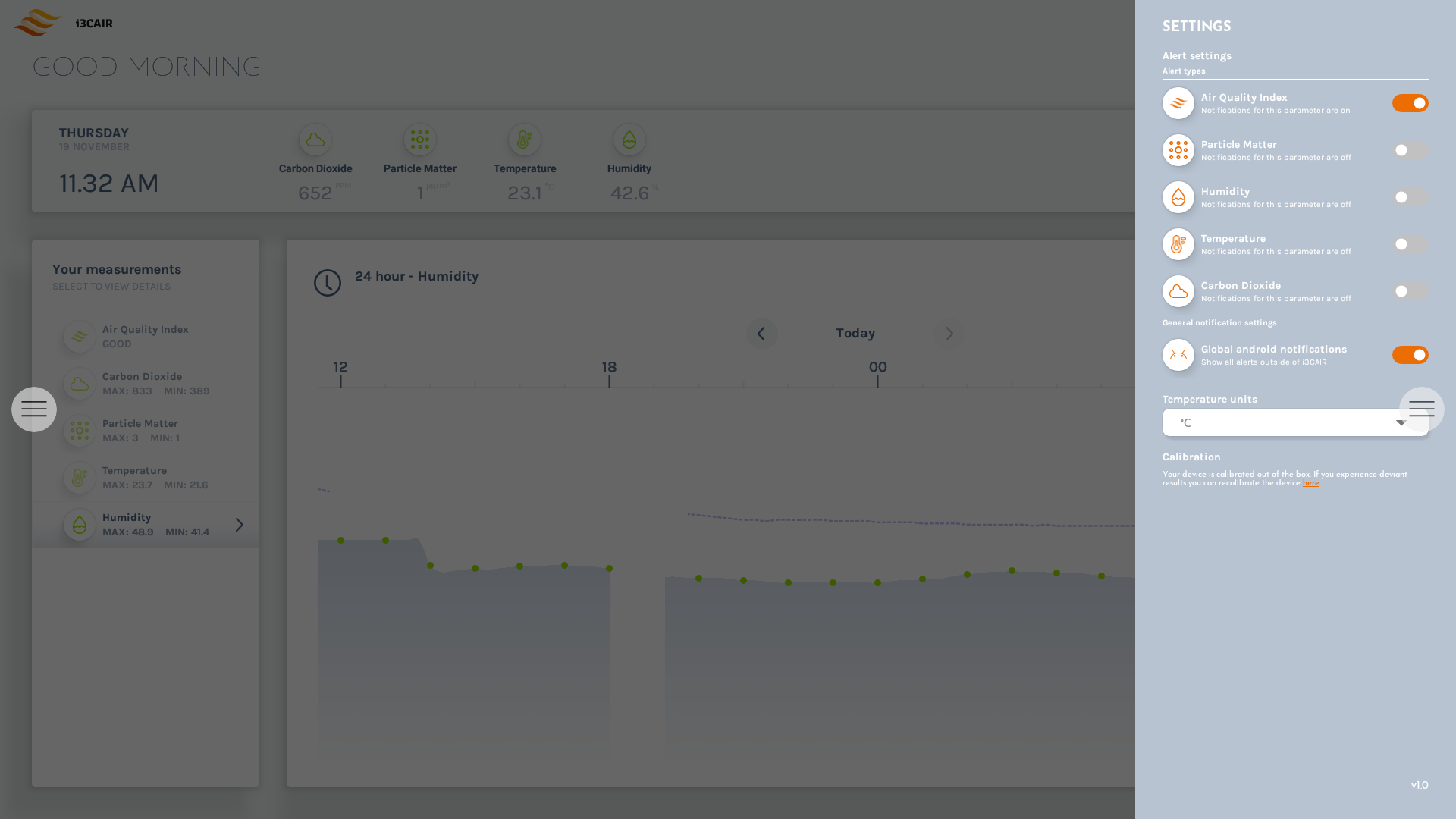
The settings panel has a few options that you can customize:
-
Enable or disable alerts for different sensor types. When disabled, no alert will ever be created for that sensor type.
-
Global android notifications. When enabled and an alert is triggered, a popup will appear on the screen in real time. Even when the i3CAIR app is currently not in the foreground.
-
Preferred temperature unit. Choose here between °C or °F for displaying temperature values in the app.
-
Start CO² calibration, see below for more details.
CO² calibration
Your device is calibrated out of the box. Only use this function if you notice abnormal or inaccurate CO2 readings.
Before you proceed with the CO2 sensor calibration. Make sure to position the i3CAIR sensor box in a location with good outside air circulation. For example: next to an open window. The i3CAIR sensor box will use the outside air to start the calibration process.
Do not use this calibration function in a closed room with high CO² values or in a location with high outside CO2 values like a polluted city center. Doing this will result in an incorrect calibration and cause inaccurate CO2 readings.
While not required, it is recommended to leave the i3CAIR sensor box powered on for at least three weeks while completing initial calibration. The i3CAIR sensor box will continue to automatically calibrate over a longer period of time to further increase the accuracy of CO2 readings. Even after the device is no longer positioned close to outside air.