
Need to mount your i3SIXTY 3 50” on its mobile stand or wall frame? This guide walks you through safe, secure installation, so your display is ready for action, not accidents. Use this article if you’re an installer or facilities manager setting up the i3SIXTY 3. Don’t use these steps for other i3CONNECT displays or if you’re unsure about wall quality. Consult a professional in those cases.
By the end, your i3SIXTY 3 will be safely mounted and ready to roll (or stay put). If the display feels unstable or you can’t secure it, stop and contact support.
Before you start
-
Have at least 2 people available for lifting
-
Check your wall quality and use suitable hardware for your wall type.
-
Only use the standard mounting points on the display.
-
Follow all local safety laws and regulations.
Installation for 50” display on mobile stand
|
Description |
Document |
Last updated |
|---|---|---|
|
i3SIXTY 3 mobile stand installation instructions |
Instructions for standard wall frame
Mechanical clearance & position
-
Use only the standard mounting points on the i3SIXTY 3 for installation.
-
Maintain at least 5mm (0.2”) clearance around the display to prevent mechanical stress.
-
Keep moving parts at least 2cm (0.8”) away from the display.
-
Install the display upright and level, with a vertical tilt no greater than ±5°.
Installation height
-
Adjust the installation height to suit the typical user’s reach.
-
Consider a height-adjustable frame if needed.
-
Installer is responsible for judging wall quality and choosing proper hardware.
-
Use at least 4 fixation points at the outermost edges of the frame.
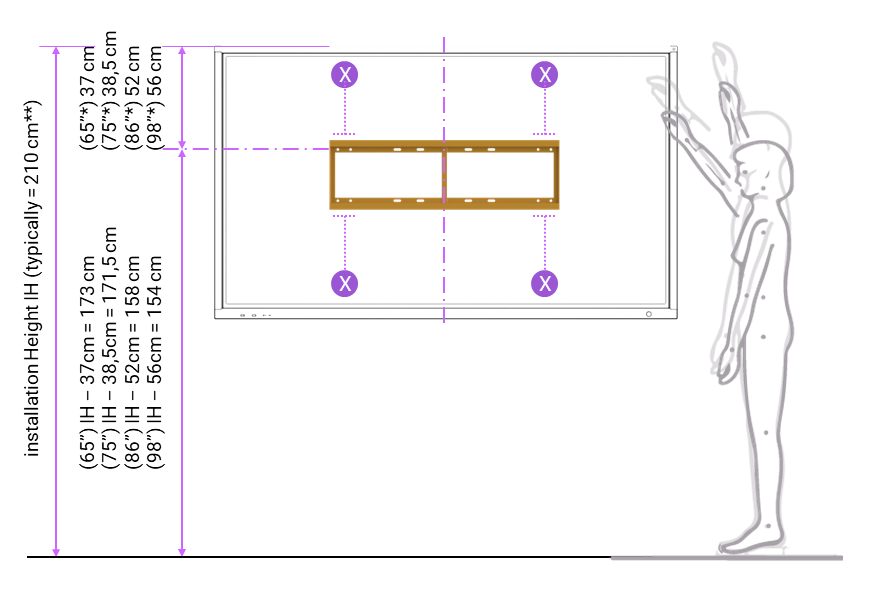
Fixed installation on a standard wall frame
-
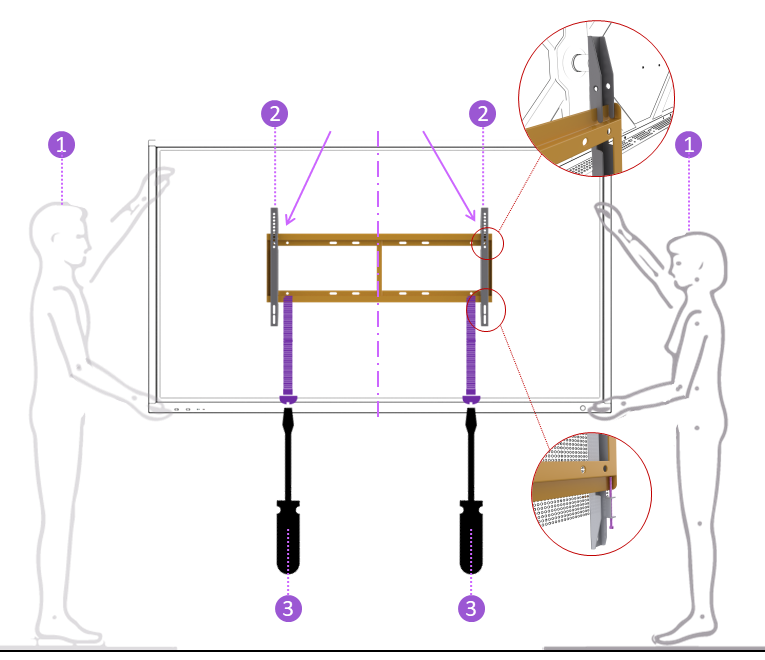
Lift the display with at least 2 people (4 for sizes above 90”). Never exceed local lifting limits.
-
Snap both vertical brackets behind the top profile of the wall frame.
-
Secure both safety screws from underneath the display to the wall frame.
-
Double-check all fixations before leaving the display unattended.
Troubleshooting
-
If the display cannot be securely fixed, or the wall/frame feels unstable, do not proceed—consult a professional.
-
If you’re unsure about hardware compatibility with your wall, seek expert advice.
-
For other i3CONNECT models, refer to their specific installation guides.