
Make sure to connect your i3CAMERA PRO 4K into an USB2.0 slot of your i3TOUCH.
Change camera setting if necessary
Connect your i3CAMERA to a Windows computer and open the default Windows CAMERA app.
Accessing the OSD menu while using the i3CAMERA in an ANDROID APP, might mirror the image from the i3CAMERA and therefore making the change of setting difficult to navigate.
Open the OSD settings menu with the remote control:
-
SETTINGS
-
UVC EXT SETTINGS
-
Enable H264
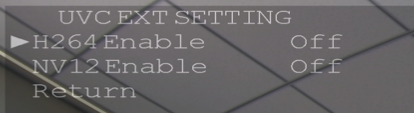
Flip the H264 setting to Off if you want to enable the microphone in ANDROID.
Flip the H264 setting to On if you want to enable the microphone in Windows.
-
-
Then unplug & replug the usb cable of the camera.
If you wish you can also watch the video on how to adjust the H264 setting