
Instructions
-
Click in the displays overview in the lower left of the screen on the button “Add a CTOUCH display”.
-
Fill in a display name, location (enter a new location or choose in the dropdown menu for an existing location) and enter the serial number of the CTOUCH touchscreen.
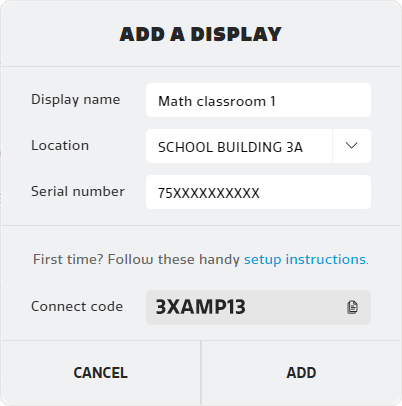
Information above is just an example
-
Remember or write down the connect code and press “add”.
-
Now, the screen is added to Sphere but still ‘offline’ because a connection with the touchscreen must be made.
-
Next, open the Sphere App on the display and enter the serial number of the touchscreen and enter the connect code.
-
Finally, press “connect” and the connection is made between the touchscreen and Sphere. The connection status is shown in the Sphere App.