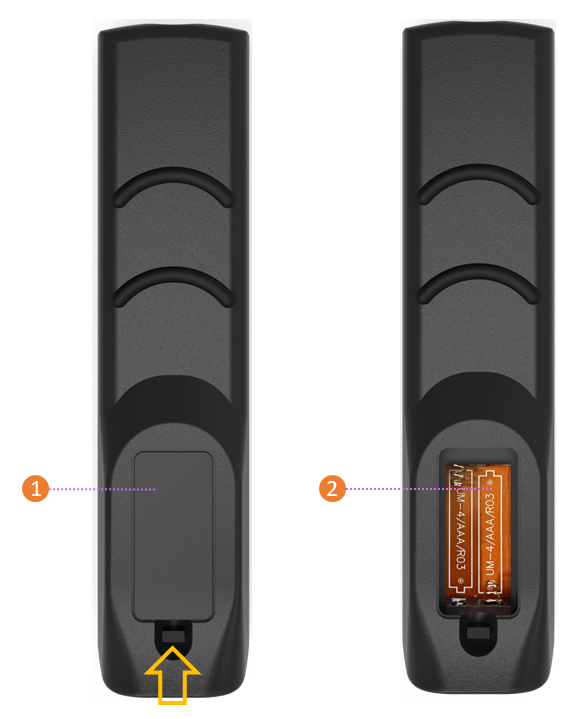
Overview remote control buttons
-
Display power on
-
Mute/unmute the sound
-
Start
-
Space
-
Alt+Tab cycles through open apps
-
Alt+F4 closes application
-
Keypad for numeric input
-
Return to previous menu item
-
Display (freeze)
-
Go to Main menu
-
Select different input
-
Enter Settings menu
-
Quick action button
-
4-way selection button
-
Dim / show display (backlight on/off)
-
Back (return to previous)
-
Enter (confirm selection)
-
Page up / down
-
Start whiteboard application
-
Volume up / down
-
Channel up / down
-
Function keys
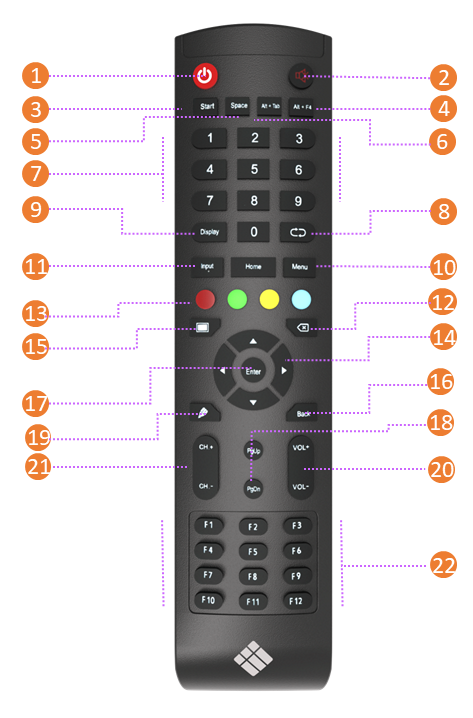
Battery compartment
Make remote control ready for use
-
Open the back cover by sliding the latch up and taking off the lid
-
Insert 2x AAA batteries; pay attention to the correct orientation
-
Reinsert the lid